Writing Packets to Pcapng in C
1. Introduction
Welcome back fellow researchers! Recently, I was developing custom tools for packet sniffing in C and needed to write my own PcapNG library. The PcapNG file structure can be found on the Official PcapNG Documentation. Even though Erik Hjelmvik, the author was nice enough to provide examples for different section blocks, the guide isn’t the most comprehensible.
Therefore, I thought it would be good to share some insights on writing a simple library in C to save your packets in a PcapNG file. And of course, I will be providing the source code here as well.
2. Overall PcapNG Structure.
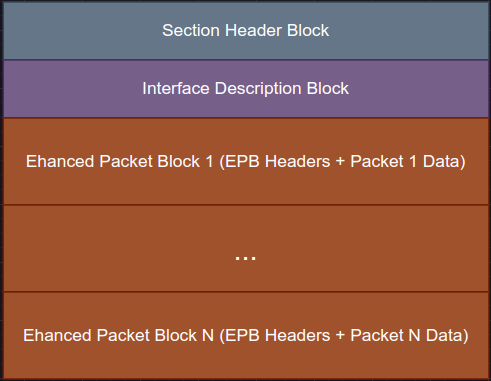
Figure 1. PcapNG Structure
The overall structure can be broken down into 3 parts:
- Section Header Block (SHB)
- Only can have 1
- Interface Description Block (IDB)
- Can have multiple IDBs to represent different interfaces
- Enhanced Packet Block (EPB)
- EPB headers can relate back to different interfaces where the packet was captured.
In addition, the entire structure must be word-aligned (divisible by 4 bytes). This means that padding is necessary if it’s not word-aligned.
- Ensure that you pad with
0x00just before the redundant block total length section. - Do not pad
0x00at the end of each block!
3. Section Header Block (SHB)
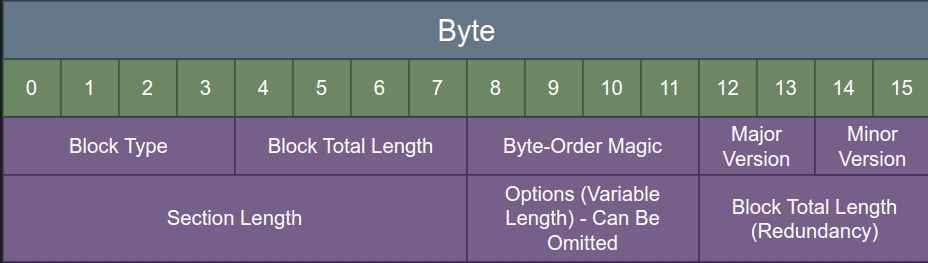
Figure 2. SHB Structure
Figure 2 can be partially translated into the following SHB header struct:
typedef struct {
    uint32_t block_type;
    uint32_t block_length;
    uint32_t bom;
    uint16_t major_version;
    uint16_t minor_version;
    int64_t section_length;
} shb_headers_t;
Listing 1. SHB Header Struct
Do take note that I did not include a uint32_t block_length_redundant in the struct. This is because we have to place
a padding before the redundant block length, and the padding length can vary. A struct declaration cannot take in a member with
a variable size and therefore, we have to declare it separately. The same logic will be carried through to the other blocks.
According to the documentation, there are some constants we need to adhere to:
- Block Type =
0x0A0D0D0A–> SHB Type - Byte-Order Magic =
0x1A2B3C4D–> Little Endian - Major Version =
0x0001 - Minor Version =
0x0000 - Section Length =
0xFFFFFFFFFFFFFFFF–> -1
The writing of the SHB section can be translated into the following C snippet:
#define SHB_TYPE 0x0A0D0D0A
#define BOM 0x1A2B3C4D

bool pcapng_write_shb_section(FILE *pcapng_file) {

    uint32_t block_length = sizeof(shb_headers_t) + sizeof(block_length);
    uint32_t padding_length = 4 - (block_length % 4);
    block_length += padding_length;

    char unsigned *padding = malloc(padding_length);
    memset(padding, 0, padding_length);

    shb_headers_t shb_headers = {
        .block_type = SHB_TYPE,
        .block_length = block_length,
        .bom = BOM,
        .major_version = 1,
        .minor_version = 0,
        .section_length = -1
    };
    if (!fwrite(&shb_headers, sizeof(shb_headers), 1, pcapng_file)) {
        return false;
    }
    if (!fwrite(padding, padding_length, 1, pcapng_file)) {
        return false;
    }
    if (!fwrite(&block_length, sizeof(block_length), 1, pcapng_file)) {
        return false;
    }
    fflush(pcapng_file);
    return true;
}
Listing 2. Write SHB Section Example
4. Interface Description Block (IDB)

Figure 3. IDB Structure
Figure 3 can be partially translated into the following IDB header struct:
typedef struct {
    uint32_t block_type;
    uint32_t block_length;
    uint16_t link_type;
    uint16_t reserved;
    uint32_t snap_len;
} idb_headers_t;
Listing 3. IDB Header Struct
Constants to adhere to:
- Block Type =
0x00000001–> IDB Type - Link Type =
0x0001–> Ethernet - Reserved =
0x0000 - Snap Length =
0x0000FFFF(65535 bytes) OR
=0x00040000(256kB) OR
=0x00000000(No Limit)
The writing of the IDB section to a PcapNG file can be translated into the following C snippet:
#define IDB_TYPE 0x00000001

bool pcapng_write_idb_section(FILE *pcapng_file) {

    uint32_t block_length = sizeof(idb_headers_t) + sizeof(block_length);
    uint32_t padding_length = 4 - (block_length % 4);
    block_length += padding_length;

    char unsigned *padding = malloc(padding_length);
    memset(padding, 0, padding_length);

    idb_headers_t idb_headers = {
        .block_type = IDB_TYPE,
        .block_length = block_length,
        .link_type = 1,
        .reserved = 0,
        .snap_len = 65535

    };
    if (!fwrite(&idb_headers, sizeof(idb_headers), 1, pcapng_file)) {
        return false;
    }
    if (!fwrite(padding, padding_length, 1, pcapng_file)) {
        return false;
    }
    if (!fwrite(&block_length, sizeof(block_length), 1, pcapng_file)) {
        return false;
    }
    fflush(pcapng_file);
    return true;
}
Listing 4. Write IDB Section Example
5. Enhanced Packet Block (EPB)
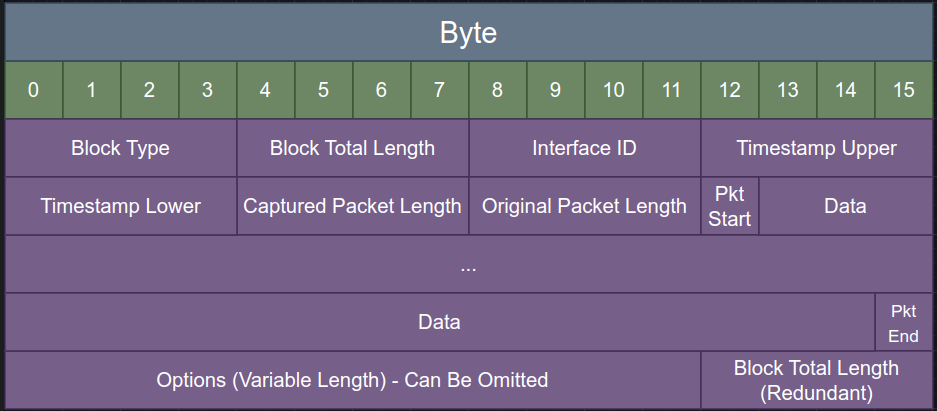
Figure 4. EPB Structure
Figure 4 can be partially translated into the following EPB header struct:
typedef struct {
    uint32_t block_type;
    uint32_t block_length;
    uint32_t interface_id;
    uint32_t timestamp_high;
    uint32_t timestamp_low;
    uint32_t captured_len;
    uint32_t original_len;
} epb_headers_t;
Listing 5. EPB Header Struct
Constants to adhere to:
- Block Type =
0x00000006–> EPB Type - Interface ID =
0x00000000–> First IDB
=0x00000001–> Second IDB (If there is more than 1)
Things to note:
- Timestamp Upper =
(uint32_t)(unix_epoch_microseconds >> 32) - Timestamp Lower =
(uint32_t)(unix_epoch_microseconds) - In most cases,
captured_length == original_len, unless a short snap length is used. - If a packet is truncated due to a short snap length stated in the IDB section, then
captured_length < original_len.
The writing of the EPB section to a PcapNG file can be translated into the following C snippet:
bool pcapng_write_packet(FILE* pcapng_file, unsigned char *packet_data, uint32_t packet_length) {

    uint32_t block_length = sizeof(epb_headers_t) + packet_length + sizeof(block_length);
    uint32_t padding_length = 4 - (block_length % 4);
    block_length += padding_length;

    char unsigned *padding = malloc(padding_length);
    memset(padding, 0, padding_length);

    uint32_t ts_high = 0;
    uint32_t ts_low = 0;
    struct timeval tv;

    gettimeofday(&tv, NULL);
    uint64_t unix_epoch_microseconds = (uint64_t)tv.tv_sec * 1000000ULL + (uint64_t)tv.tv_usec;

    ts_high = (uint32_t)(unix_epoch_microseconds >> 32);
    ts_low = (uint32_t)(unix_epoch_microseconds);

    epb_headers_t epb_header = {
        .block_type = EPB_TYPE,
        .block_length = block_length,
        .interface_id = 0,
        .timestamp_high = ts_high,
        .timestamp_low = ts_low,
        .captured_len = packet_length,
        .original_len = packet_length
    };

    if (!fwrite(&epb_header, sizeof(epb_header), 1, pcapng_file)) {
        return false;
    }
    if (!fwrite(packet_data, packet_length, 1, pcapng_file)) {
        return false;
    }
    if (!fwrite(padding, padding_length, 1, pcapng_file)) {
        return false;
    }
    if (!fwrite(&block_length, sizeof(block_length), 1, pcapng_file)) {
        return false;
    }
    fflush(pcapng_file);
    return true;
}
Listing 6. Write EPB Section Example
6. Example Usage of pcapng.h
After putting all the logic into a header file called “pcapng.h”, and asking chatgpt to generate some sample data for us to test, we are ready to go! If you want to follow along for this part of the walkthrough, you can get a copy of my files here.
The following listing shows a simple example of saving packets to a PcapNG file called “output.pcapng” in the same directory.
#include "pcapng.h"
#include "pcapng_samples.h"

int main (void) {

    FILE *pcapng_file = pcapng_init_file("output.pcapng");
    pcapng_write_packet(pcapng_file, sample_tcp_syn, sizeof(sample_tcp_syn));
    pcapng_write_packet(pcapng_file, sample_icmp_request, sizeof(sample_icmp_request));
    pcapng_close_file(pcapng_file);

    return 0;
}
Listing 7. test.c
Compile the C program and run it.
$ gcc test.c -o test
$ ./test
Listing 8. Running Test Case
We can now view our “output.pcapng” file with Wireshark!

Figure 5. Wireshark - output.pcapng
7. Conclusion
If you have reached this stage after going through the above sections, you are now a qualified expert on writing PcapNG structures 😎.
In my next post, I am going to share some important tips for static and dynamic analysis based on past mistakes that I had made. Till then,
stay safe and keep being awesome. Over and out!
8. References
- Official PcapNG Documentation: https://pcapng.com/