
Linux Kernel Module Debugging
1. Introduction
Kernel module debugging is the art you master after printk() betrays you.
If you are a kernel developer, writing drivers, hacking on memory management, or building experimental things like verification or virtualization logic in kernel space, being able to debug LKMs matters a lot. Once your code is running below userspace, printk() quickly stops being enough. Without symbols, every crash turns into guesswork and every bug feels expensive.
Over time, some pretty slick tooling has appeared to smooth this out. Debugger extensions like bata24’s fork of GEF can automatically load kernel module symbols at the right runtime offsets. They handle relocation, KASLR, and section layout details for you, making kernel debugging feel almost civilized.
But here’s the fun part, you do not actually need any of that. (Credits to Keith! You are the MVP)
The kernel already exposes the exact section addresses of loaded modules. With a simple, old-school approach, you can load symbols manually and get the same result, using data straight from the kernel itself. No heuristics, no inferred relocation bases, and no black-box magic. Just reliable, transparent debugging that works because the kernel says it does.
That is the path we are going to take in this post.
2. Setting Kernel Debugging Environment
For my target VM, I am running Ubuntu 24.04 on VMware Workstation.
Before running it, add the following lines anywhere in the .vmx file:
debugStub.listen.guest64 = "TRUE"
debugStub.listen.guest64.remote = "TRUE"
debugStub.port.guest64 = "8864"
After starting the VM, we can verify that our host machine is listening on port 8864.
gerald@host:~$ ss -antp | grep 8864
LISTEN     0      5            0.0.0.0:8864          0.0.0.0:*
LISTEN     0      5               [::]:8864             [::]:*
Lastly, we should verify that we can attach gdb from our host to the listener. (127.0.0.1:8864)
(gdb) target remote 127.0.0.1:8864
Remote debugging using 127.0.0.1:8864
0xffffffffb51999fb in ?? ()
(gdb) detach
(gdb) quit
For QEMU users, please follow my previous guide to set up a GDB stub through libvirt.
3. Creating a Test LKM
-
Create a simple LKM (random_loop.c) that generates random numbers every second:
LKM Source Code:random_loop.c#include <linux/module.h> #include <linux/kernel.h> #include <linux/kthread.h> #include <linux/delay.h> #include <linux/random.h> MODULE_LICENSE("GPL"); MODULE_AUTHOR("mathscantor"); MODULE_DESCRIPTION("LKM that generates a random number every second"); MODULE_VERSION("0.1"); static struct task_struct *thread; // Thread function: generates random number every second static int random_thread_fn(void *data) { while (!kthread_should_stop()) { u32 rand; get_random_bytes(&rand, sizeof(rand)); pr_info("random_loop_module: random number = %u\n", rand); msleep(1000); } return 0; } static int __init random_loop_init(void) { pr_info("random_loop_module: loaded\n"); thread = kthread_run(random_thread_fn, NULL, "random_loop_thread"); if (IS_ERR(thread)) { pr_err("random_loop_module: failed to create thread\n"); return PTR_ERR(thread); } return 0; } static void __exit random_loop_exit(void) { if (thread) kthread_stop(thread); pr_info("random_loop_module: unloaded\n"); } module_init(random_loop_init); module_exit(random_loop_exit);
-
Create aMakefile:
LKM Makefileobj-m := random_loop.o KDIR ?= /lib/modules/$(shell uname -r)/build PWD := $(shell pwd) all: $(MAKE) -C $(KDIR) M=$(PWD) modules clean: $(MAKE) -C $(KDIR) M=$(PWD) clean
-
Compile the kernel module:
Compiling LKMgerald@ubuntu-2404:~/Desktop/lkm-debugging$ make gerald@ubuntu-2404:~/Desktop/lkm-debugging$ ls -l ... -rw-rw-r-- 1 gerald gerald 318584 Feb 15 11:22 random_loop.ko ...
-
Insert the kernel module:
Inserting LKMgerald@ubuntu-2404:~/Desktop/lkm-debugging$ sudo insmod random_loop.ko
4. Debugging Test LKM
Our objective here is simple: To dynamically observe the random number before it gets printed to the kernel logs.
-
Transfer a copy of random_loop.ko to the host.
-
When a kernel module is loaded, it does not land at a fixed address. KASLR makes sure of that. Luckily, the kernel is not trying to hide this information from us. Every loaded module exposes its resolved section addresses via/sys/module/<LKM_NAME>/sections
Sections of random_loop LKMgerald@ubuntu-2404:~$ ls -la /sys/module/random_loop/sections total 0 drwxr-xr-x 2 root root 0 Feb 15 13:02 . drwxr-xr-x 5 root root 0 Feb 15 13:01 .. -r-------- 1 root root 19 Feb 15 13:02 .bss -r-------- 1 root root 19 Feb 15 13:02 .call_sites -r-------- 1 root root 19 Feb 15 13:02 .exit.data -r-------- 1 root root 19 Feb 15 13:02 .exit.text -r-------- 1 root root 19 Feb 15 13:02 .gnu.linkonce.this_module -r-------- 1 root root 19 Feb 15 13:02 .init.data -r-------- 1 root root 19 Feb 15 13:02 .init.text -r-------- 1 root root 19 Feb 15 13:02 __mcount_loc -r-------- 1 root root 19 Feb 15 13:02 .note.gnu.build-id -r-------- 1 root root 19 Feb 15 13:02 .note.Linux -r-------- 1 root root 19 Feb 15 13:02 __patchable_function_entries -r-------- 1 root root 19 Feb 15 13:02 .return_sites -r-------- 1 root root 19 Feb 15 13:02 .rodata.str1.1 -r-------- 1 root root 19 Feb 15 13:02 .rodata.str1.8 -r-------- 1 root root 19 Feb 15 13:02 .strtab -r-------- 1 root root 19 Feb 15 13:02 .symtab -r-------- 1 root root 19 Feb 15 13:02 .text
-
Get the address of .text section
Text Section Addressgerald@ubuntu-2404:~$ sudo cat /sys/module/random_loop/sections/.text 0xffffffffc0786000
-
(Optional) Get the address of other sections
- .data: Global variables
- .bss: Zero-init globals
- .rodata: Const data / strings
-
Remotely attach to the GDB stub from the host
Attaching to GDB Stub and Setting Basic Headers(gdb) target remote 127.0.0.1:8864 (gdb) set confirm off (gdb) set pagination off (gdb) set disassembly-flavor intel
-
Load the kernel module file with the relevant sections
Loading random_loop LKM at Correct Address(gdb) set $text_base = 0xffffffffc0786000 # Minimal (gdb) add-symbol-file /tmp/random_loop.ko $text_base # Appending other sections: (gdb) add-symbol-file /tmp/random_loop.ko $text_base -s .bss 0xffff...
-
Get the randomly generated number after the call to get_random_bytes(). Based on Ghidra Output (Figure 1), we need to set a breakpoint at.text+0x42
Getting Breakpoint Offset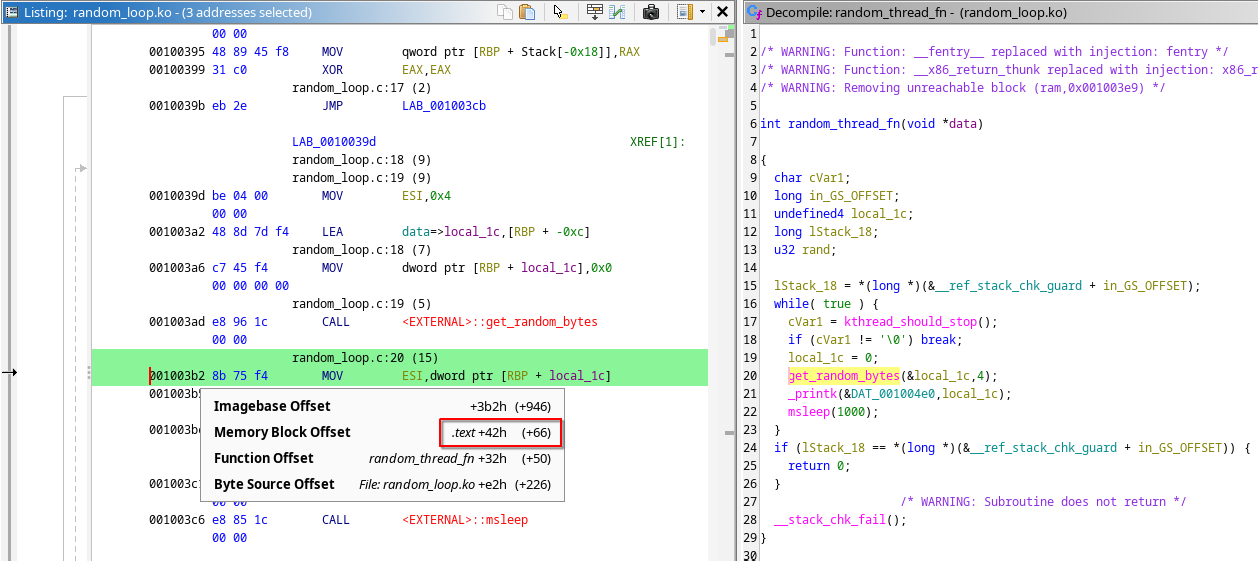
Getting Randomly Generated Number# Set a breakpoint one instruction after the call to get_random_bytes() (gdb) b *($text_base + 0x42) (gdb) continue # Check if we are at the correction instruction after breakpoint hits (gdb) x/i $pc => 0xffffffffc0786042 <random_loop_init+50>: mov esi,DWORD PTR [rbp-0xc] (gdb) x/wx $rbp - 0xc 0xffffccf200c2beb4: 0x48802b9e # This is the randomly generated number
5. Conclusion
At this point, we have done real kernel module debugging without any magic.
We built a test LKM, loaded it into a KASLR-enabled kernel, extracted its true runtime addresses directly from /sys/module/<LKM_NAME>/sections and manually loaded symbols into GDB. From there, we were able to break inside kernel code and inspect live data.
Fancy tooling like GEF absolutely has its place, especially when you want speed and convenience. But it is important to understand that underneath the abstractions, the kernel already gives you everything you need. This old-school approach is transparent, deterministic, and works anywhere the kernel does.